
Motion Sensor Switched Output Hack
Oct 19th, 2008 by Scott
Yard-light motion sensors are a cheap and easy way to add some automation to your haunt. Just hook up power to the sensor, hook the output to an outlet, and you can control anything that runs on 120VAC. But what if you want to control something else? It turns out it’s pretty easy to modify these motion sensors so the output just acts like a normal switch or button. Here are some of the things you can control with a modded motion sensor:
- LED spotlights
- Any Halloween prop with a “Try Me” button
- CD / MP3 player
- Fog machine
- Air canon
- PowerPoint presentation
Basically if you can control it with a switch or a button, you can control it with a motion sensor.
What you need
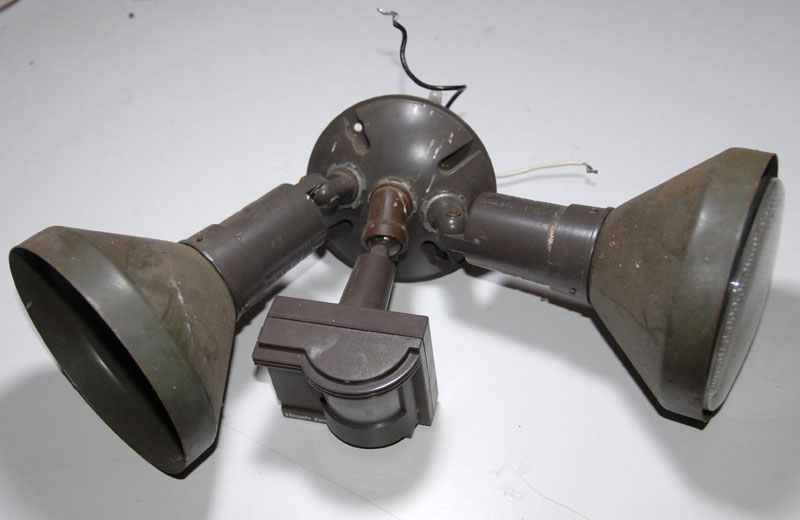
- Yard-light motion sensor
- Screwdriver
- Soldering stuff
- Utility/Xacto knife
- Insulated wire
- Multi-meter
You don’t have to get fancy with the motion sensor. Good = $8 El-Cheapo unit from hardware store. Better = $0.25 unit you got from a garage sale (that’s how much I paid for the one in this example).
Take the motion sensor apart
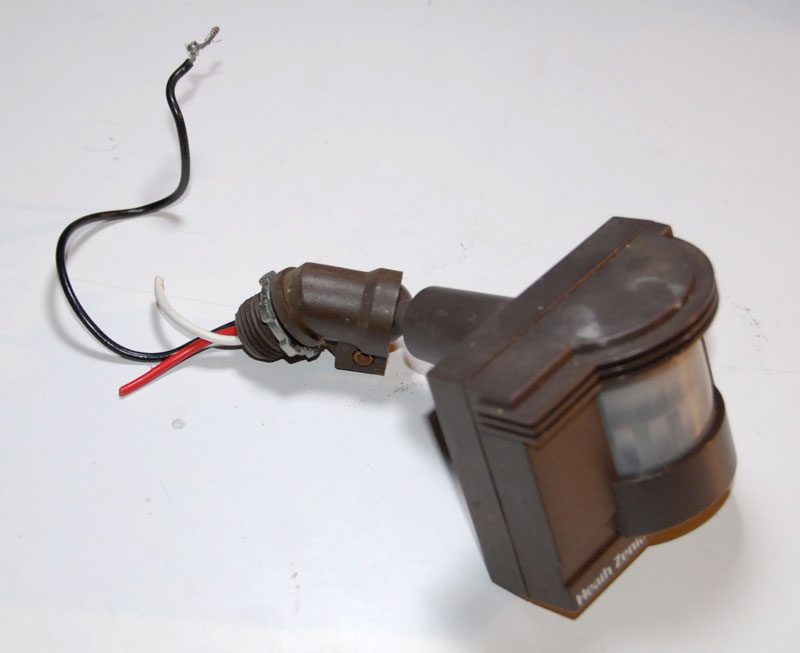
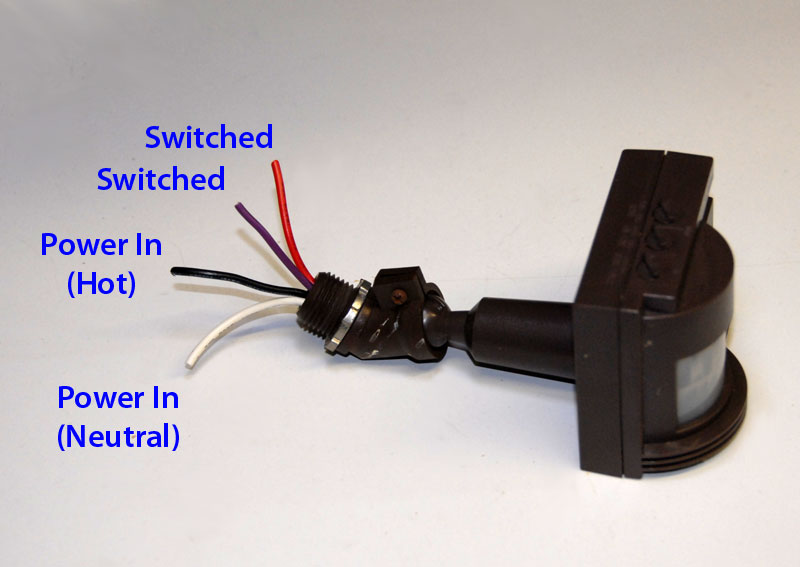
First separate the sensor unit from whatever base / sockets it is hooked to. As you do so make a note of how everything is hooked up. You need to identify which color wire is what. Here is the scheme used by most sensors:
- White = Power In (Neutral)
- Black = Power In (Hot)
- Red = Switched Power Out
Also take note of which incoming power wire is connected directly to the flood lights. It will most likely be the white (neutral) one since the sensor switches the black (hot) one. I have seen sensors that switched neutral before though.
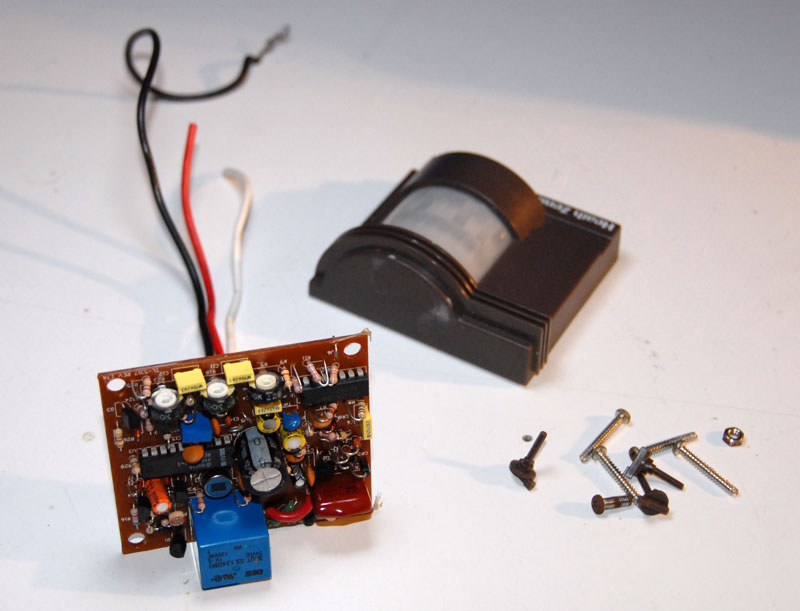
Now take apart the motion sensor itself and pull the board & wires out. How you do this will depend on the exact sensor you have.
Find the relay
Look at the component side of the circuit board. You need to find the relay (the part that acts like the switch). It’s usually a blue plastic box looking thing. It may be black or clear or some other color, but most of the ones I’ve cracked open had blue ones. Here is the relay in my sensor:
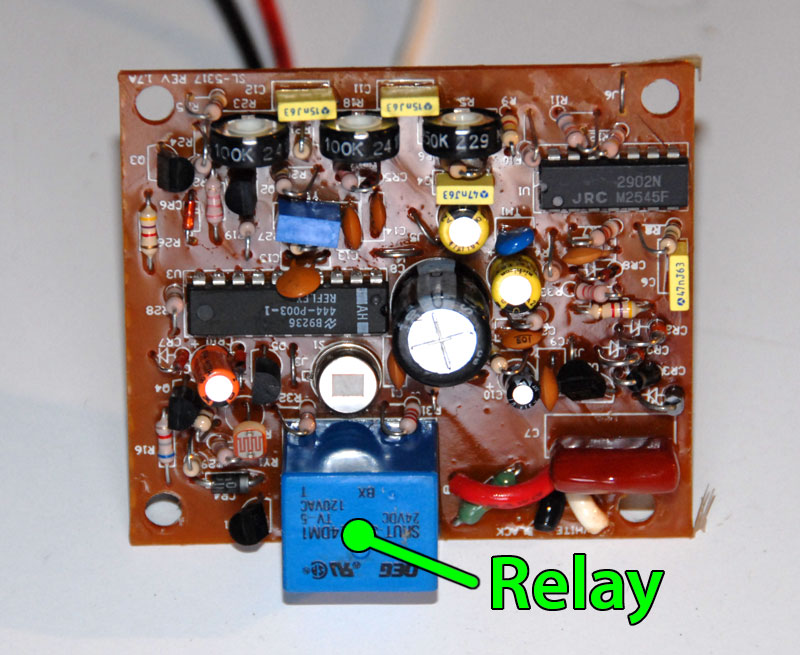
Now that you’ve located the relay, flip the board over and find all the solder connections that go to the relay.
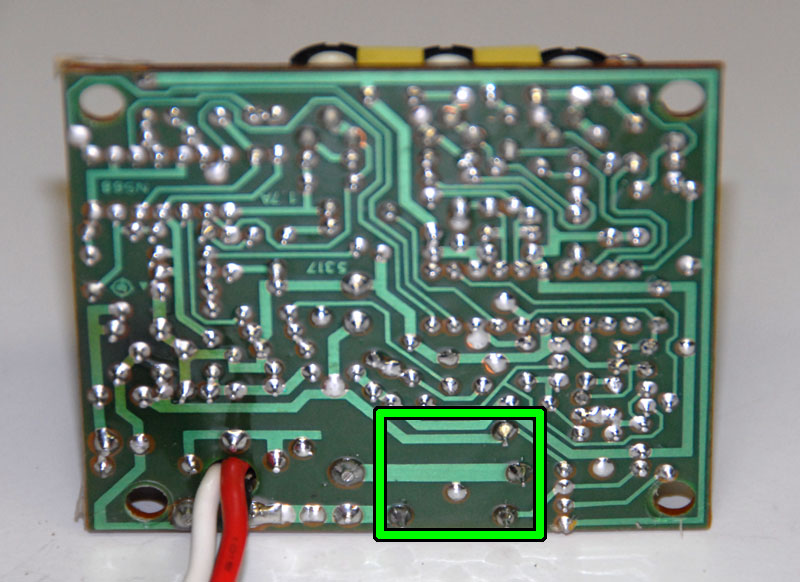
Mine has four, but yours may have up to 8 or more.
Identify relay connections
Here is a simplified schematic of how the relay will be connected:
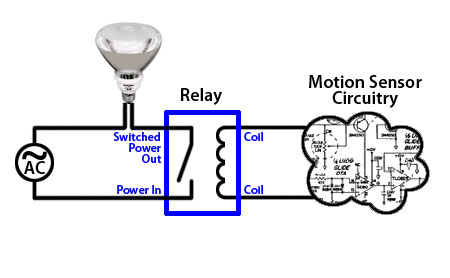
You’ll need to identify the following connections on your relay:
- Power in
- Switched power out
- Coil in (x2)
It shouldn’t be too hard. Here are some hints:
- The power in connection should go to one of the power in wires (most likely black, but maybe white)
- The switched power out connection will go to the red output wire
- The remaining connections are for the coil and probably go to a bunch of random circuitry. You don’t really need to worry about these.
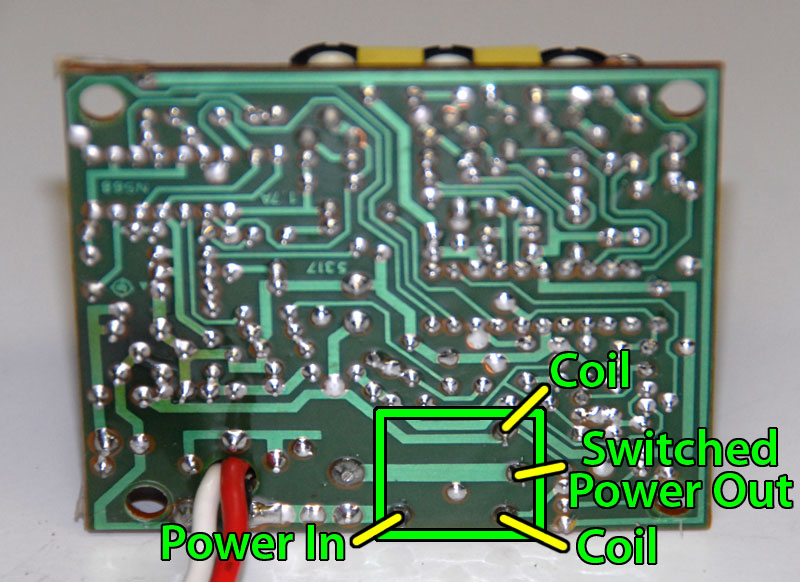
Here are the connections on my sensor:
Cut the power
The first mod we need to do is to cut the power going through the relay without disrupting power to the rest of the circuitry. If the relay connection is at the opposite end of a trace from the power coming in then it’s simply a matter of cutting the trace right before the relay connection.
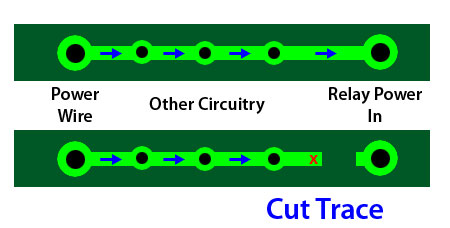
When you cut the trace, make two cuts then use the knife to peel up the copper in between. If you just make a single cut you run the risk of electricity arcing across the small gap.
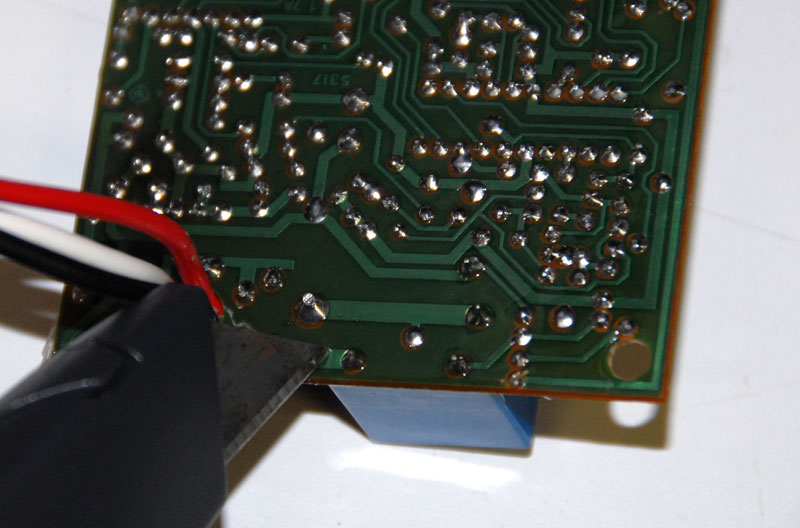
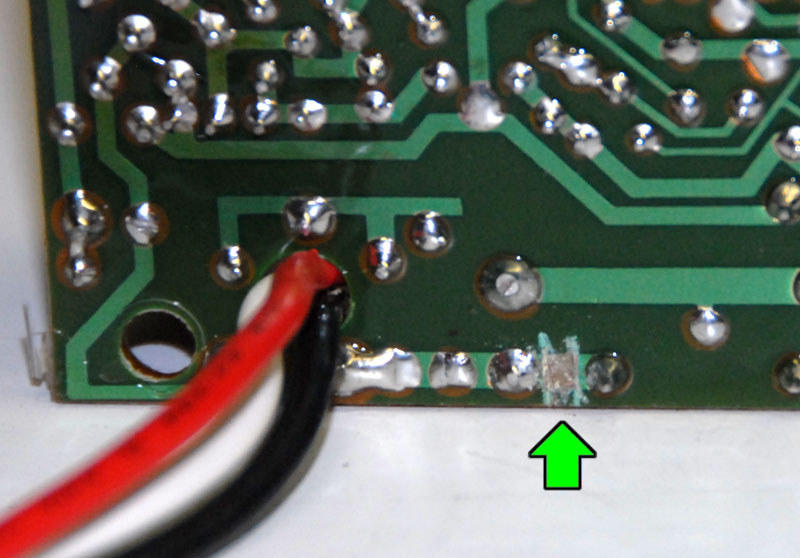
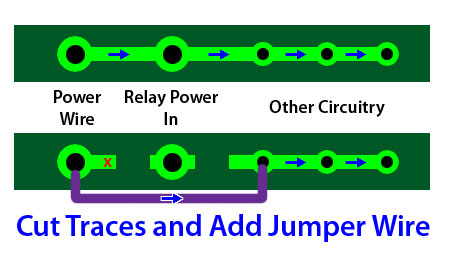
The other possible scenario is that the relay will be in the middle of the trace, with power coming in one side and some circuitry connected on the other. In this case you’ll need to cut the trace on either side of the relay connection, then solder a jumper wire that bypasses the relay.
Add a second output wire
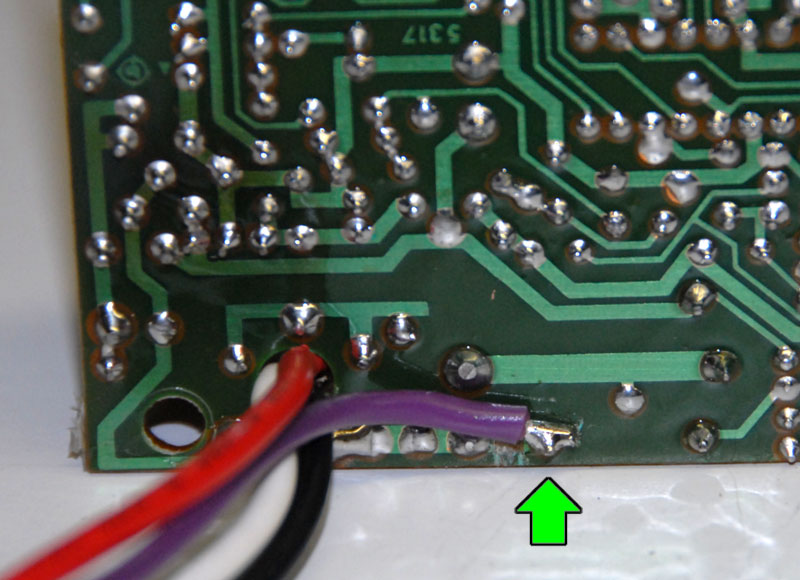
Now that there is no power going through the relay, we need to solder on an additional wire to the relay connection we just isolated.
Testing
That’s it for the modifications. Put everything back together.
You should now have a motion sensor with four wires coming out of it. The black and the white wires provide power to the sensor and should be connected to 120VAC. The red wire and the new one you added (purple on mine) are connected to the contacts on the relay. When the sensor detects motion, they are connected together. When it times out or sees no motion, they aren’t.
It’s very important that you test your newly modded motion sensor with a meter before you go connecting it to any of your equipment (just in case you didn’t successfully remove power from the relay).
Activate “Test” mode on your sensor if it has it (it will work even if it’s light in the room and only stay on for a very short period of time when it is triggered).
Hook the black and white wires up to power.
Set your meter for AC volts.
Trigger the motion sensor by waving your hand in front of it.
Check for voltage between the red wire and the white wire. There shouldn’t be any.
Check for voltage between the red wire and the black wire. There still shouldn’t be any.
Check for voltage between the red wire and your new wire. Should still be ~0V.
Now set your meter to test for continuity (keep it connected to the red and new wire). You should get continuity (~0 ohms) when the sensor has been triggered, and none (display probably reads “1”) when it hasn’t been triggered.
If your sensor passes all the above test then you are ready to start controlling props with it.
Connecting the sensor
This is the part where your imagination comes in. As I said before, you can connect the two output wires to anything that is normally connected to a switch.
- LED spotlights: Connect the power supply, sensor and LED in series. Replaces normal on/off switch.
- Prop with “Try Me” button: Clip the two wires that go to the button and connect them to the sensor’s output wires.
- CD/MP3 player: Solder two wires to the play button. Connect the wires to the sensor’s output wires. This does not affect the functionality of the player’s own play button.
- Fog machine: Connect two wires between the fog button and the sensor’s output wires.
- Air cannon: Hook the sensor’s output wires up in place of (or in parallel with) the cannon’s fire button.
- PowerPoint presentation: Hack a keyboard so that the sensor’s output wires connect across whatever two contacts the space bar connects to.
What about the trace on the load side (“switched power out”) of the relay (small via about half way along the trace). Where does it go and what does it do?
@Vicki- I had no idea. You got me curious about it though so I took the sensor back apart. After some solder-suckering on the relay I discovered that the “via” goes absolutely nowhere. It doesn’t even go through the board. All I can think of is that it’s a test point so that they can verify that power is making it to the other side of the relay at the factory.
Why go to so much trouble? Just screw a receptical socket into the existing light socket and plug your device in. . .
Am I missing something?
@Deanes- The point of doing this is so that you can control things that don’t run on 120v. Let’s say you wanted to trigger an LED. LEDs only run on ~2-3 volts. If you hooked one directly to the socket using an adapter it would probably shatter into quite a few pieces. This hack essentially creates a switch instead of a power source. Hook it in series with and LED, a battery and a resistor and now you have a motion-sensor LED.
this is a really cool trick i just have one question
im in australia so obviously everywhere u say 120v = 240v for me.
anyway i purchased a strobe light which runs off wall power and i was wondering if i could connect this type of setup to the strobe so that whenever someone walks in front of the sensor, the strobe light flickers for the duration of movement? i have taken apart the strobe and can see a wire which could easily be cut to act as the “jump” but im just worried that since my strobe has its own power and ur asking to connect the sensor to power where exactly does all this come into play?
the effect im going for is a papparazzi look for the entranceway at my “hollywood” themed birthday party! cool idea huh?
That is a cool idea. I think it will be easier to implement that you’re making it though. Since the (unmodded) motion sensor is already outputting power (240v in your case) and the strobe can be turned on and off by providing / interrupting power, the easiest thing to do would be to hook an outlet to the output wires of the sensor and plug the strobe into it. Of course put a plug on the input wires of the sensor so you can plug it in to the wall for power. Voila! Instant paparazzi!
Hey great info! Cheers.
Just wondering if you could hook up a mobile phone to the motion dectector so it calls you when it goes off?
Sure. Just hook the relay contacts across the two contacts of the “Send” button (make sure it’s a phone that redials when you press “Send”) or use a number key if it has speed-dial numbers or something.
Like Deanes said, just screw in an outlet receptical and then use a charger for a cell phone to bring the voltage down to 3-5v.
The only hacking involved is cutting the connector off the opposite end of the cord and use wire nuts and electrical tape to connect the wires.
Remember, hacking is about making things do something they weren’t intended to do in the easiest way possible.
That will work for powering the phone. You still need to make it dial somehow.
Do you connect it to the original 120V power source?
@Dave: Yes. The 120V is still needed to power the motion sensor. The difference is that now the 120V doesn’t come out the output.
Hi, I have a Christmas Santa that is sound activated, and would like to make him motion activated. People don’t want to stand on the sidewalk and clap, even if they know they have to clap. Would this type of application work for this. The santa is conected to a 120v but the sound box is on a transformer. Thanks, Jackie
@Jackie: Actually you wouldn’t even need to take a motion sensor apart. Just hook a male plug to the input of the sensor and a female plug to the output. Then get rid of the sound-activated part of your Santa all together (I’m assuming you just don’t want it sound-activated at all). Hook the bulb(s) in the Santa to a male plug. Plug Santa into the motion sensor and the sensor into power and whenever people walk by Santa will come on.
Hi, Scott. The Santa nods and waves all the time (being plugged in), but the sound activation will only come on when you clap your hands. This is a Gemmy inflatable, and we tried to hook up a motion sensor to it but nothing happened. It seems to want to hear the “clap” of the hands to activate. I would love to have it motion activated as clapping seems a waste of time. There is no light to hook into and the sound box is attached to the santa via a transformer. Would you have to use a battery, in case the 120v was to strong for the sound box? Maybe this can’t be done, I thought it would be easy, but my husband is at a loss as to how to do it. Thanks, Jackie
Sorry, I thought he lit up when there was sound. Now I gather he plays music or says stuff when someone claps. Do you have a link to the exact Santa?
Hi, Scott, I seem to have trouble posting. Jackie
Hi Scott. He has his voice box under the arm that moves and the transformer from the voice box is attached to the motorized mechanizim at the head. From there the unit is plugged into a 120v outlet. I hope this helps. I can try to take is apart and take some shots of the “box” on the inside if you like. I don’t seem to be able to place a link here. Thanks Scott, Jackie
Hi Scott, I bought it at an online store called buycostumes and searched for sitting santa. Everytime I try to place a link the post won’t work . Hopefully you will be able to find it OK. Thanks, Jackie
Sorry, links are probably disabled to help fight spam.
Anyway, I looked up your Santa. Unfortunately I couldn’t find much technical information on it. I was hoping that there was some kind of test / try-me button that you could tap into easily.
I think I’d have to actually tear one apart to figure out how to trick it into activating whenever you wanted. The problem with sound-activated props is that you can’t just short out the microphone and have it activate.
One thing you could try is putting the relay contacts in series with the microphone. If it looks for changes in sound level as opposed to an absolute level it might work.
Another thing might be to hook a battery in series with a pretty big resistor and the relay contacts and run that into the microphone input instead of the microphone. That way whenever the motion sensor is tripped a small voltage gets sent into the microphone input and Santa might do his thing. Again I don’t know exactly what kind of signal the circuit responds to from the microphone, but it might work.
Another, decidedly more ghetto method would be to hook some kind of noise-making device to the output of the motion sensor and place that right next to the microphone. Hide/enclose the whole thing somewhere so that people will hear Santa and not the noisy thing.
I hope I’ve at least given you some things to try.
My husband bought a battery powered motion activated sensor that produces a “chime” sound when it detects motion. The output from the sensor module goes to a simple speaker, so the waveform of the output signal is a sound-like pattern. Looked at on an oscilloscope, the signal is an exponentially decaying alternating pulse. This should have been quite similar to the output from the Santa’s sound detecting microphone. He hooked up the “chime” signal output from the motion detector into the Santa’s circuit board, to replace the ceramic microphone output. He used a resistor voltage divider to test various signal levels, over the range of 9 volts to a couple of millivolts peak-to-peak, but the signal from the motion detector never triggered the Santa. The Santa’s detection circuit is so sensitive that, with the wires from the microphone disconnected, just touching the wires with the natural voltage in your body will trigger the Santa. In the end, we hooked up the Santa’s microphone again, so at least we have the sound activation working again. Very frustrating! We worked on this for several days. Any suggestions? Thanks.
Many times the little microphones they use in those devices require power to operate. Maybe that DC voltage is doing something weird to your chime circuit. Try sticking a capacitor (.1uf or something) between the speaker output of the chime and the microphone input of Santa. I’m just guessing but it does seem like what you tried should work.
Great stuff! Just what I was looking for!!
BTW, one more application for this: to connect the alarm input of a IP surveillance camera to the sensor output wires.
When motion is detected, the sensor short cuts the camera alarm input and this event event can trigger several actions:
* To send an email notification (with one or several snapshot) to a list of configurable email addresses;
* Start recording a video.
Thanks, very useful indeed!!
I have a mini dv “spy camera ” that is a MD80 clone. I am trying to make it motion activated. I was going to use a Securitron XMS PIR sensor ( leftover from a magnetic door lock assembly ). The camera has a sound activation function but it is not very sensitive. My thought was to use a 12v battery to power the PIR and use the output wires to operate a relay that will turn the camera on. the problem is that the camera needs to power up and then another button must be pressed to start recording. any suggestions?
@Wes: I would start by playing around with exactly how the record button works. If you hold the button down while you power it on does it start recording? It’s probably not that simple but sometimes you get lucky!
Another option is to tie into the microphone input. Run a small voltage or audio signal through the relay (leave the camera powered on all the time) and when the relay closes it will activate the auto-record feature.
hi, love the tutorial!
have been wondering about converting a light motion sensor to a switch for ages but didn’t know how. Could you tell me if there is an easy way to convert a sensor to be battery operated under a reasonably low voltage? I was thinking of building a motion sensor to capture wildlife so would need something battery powered.
many thanks 😀
James
Hi James. Sorry, somehow I missed your question when you first posted it.
The easiest way to make these motion sensors run off of a battery is to use one of those inverters that hooks to a car battery and outputs AC. I don’t know that this is the best solution though.
They have motion sensors that are already battery powered. Check out eBay and search for “security system motion sensor -wireless” or something like that. Make sure you get one that is made to hook to a complete security system and isn’t a self-contained alarm or wireless thing. These run on 12V usually and have relay outputs already.
Hey. What way would you go about bypassing the motion sensor? I want to be able to have the sensor work normally and I want to connect a radio switch so that I can press a button from a remote and it bypasses the motion switch temporary to stay on. It’s not plugged in so I want to connect it to the wires around the circuit board. Would I be right in saying switch connect the red and black wire?
@Danny: Does your radio-controlled switch just have a relay/switched output or does it supply power? If it’s just a switch then you can hook the two output wires to the switched wires of the motion sensor (red and purple in my example). Since the motion switch and the radio switch are then in parallel, when either one of them are on then the thing you’re controlling will be on. If you’ve got the radio switch turned on then it doesn’t matter if the motion switch is on or off.
Don’t hook anything to the black wire or you could end up cooking something. If your radio switch provides power out then you’ll have to modify it just like you did with the motion sensor so that it only provides a switched output.
I haven’t had my coffee yet so I hope that all made sense. 🙂
Really helpful hack, but does the motion sensor only work in the dark or can it detect motion in the light as well?
This hack won’t change whether or not the motion sensor works in the light or not, so most won’t work unless it’s pretty dark. That’s easy to fix though. Find the photocell (it’s the thing with a squiggly line on it beside the relay) and cover it with black electrical tape. Then the motion sensor will always think it’s night and work in any lighting conditions.
Had a question. Would this work for a car. Say I wanted to hook it up to start the car. Or activate my underbody light kit. got a unique project im working on. And it realy would help. My email is: da_80s_baby@yahoo.com
@Andre: You could make it work, but it’s not the best solution. This type of sensor requires 120VAC for power, which your car doesn’t have (unless you use an inverter).
You’d be better off starting with a motion sensor for a burglar alarm. They typically run on about 12VDC, which is conveniently what your car runs on.
ok. Thanks. I had thought about that. By any chance could you post a like to a sight that sell them. I cant seem to find any. Thanks again
Hi,
wondered if you could help, im attempting to make a cheat tin-can telephone. so instead of someone talking down into the telephone on the opposite side, when you listen, you will hear a song playing. so i want to hide a mini speaker and mp3 player inside the can, and using a sensor (murcury switch or other) that switches on the mp3, or simply plays or pauses when the can is either touched, moved, lifted, light blocked (depending on sensor) im a complete beginner and its all foreign to me, but so far i have gathered that i can take apart an existing mp3 player and attach wires to the play button plates, also using the 3.5mm jack and cutting the wire and solder straight to the speaker. I hope this makes sence – so i am looking for an appropriate sensor and the wiring that goes with it
thanks xx
@Andre: Here are a couple of sensors that are powered by 12VDC and have both normally-open and normally-closed contacts. Either should work for what you are doing:
http://www.division-6.com/products/motion-sensor.php
@Soph: I would use a mercury switch and hook it in series with the speaker and the 3.5mm jack (jack to switch, switch to speaker, speaker to jack; 3 wires). Instead of pausing the player this just interrupts the sound, so you’ll want to put the player on repeat. This way has a few advantages over other methods:
-No power required except for the battery in the MP3 player
-Don’t have to take the MP3 player apart
-Don’t have to worry about building something that will press once for play and once for pause
-Minimal extra circuitry: cheap!
Hello, I tryed the motion sensor to my Halloween prop and the sensor works great but my only issue I’m having it the it won’t activate my prop till the relay kicks off. Not when it it ingages. — any ideas?
What is the prop you are controlling? When you use the original button or whatever you are replacing with the motion sensor, did the prop only trigger when you let go of the button?
I think my neighbor has hooked a motion detector to a sound system. When I walk past certain walls it seems to trigger subwoofer noise. Is this pssible? what’s the best way to shield myself from the sensor?
Sure it’s possible. Really low frequency tones are supposed to cause a sense of uneasiness in people, so maybe he has it set up as a theft-deterrent. If you put a piece of regular window glass between you and the motion sensor it won’t see you.
Hi there would you mind sharing which blog platform you’re working with? I’m going to start my own blog in the near future but I’m having a hard time deciding between BlogEngine/Wordpress/B2evolution and Drupal. The reason I ask is because your design seems different then most blogs and I’m looking for something unique. P.S My apologies for getting off-topic but I had to ask! Drop by my webpage whenever you feel like doing so. =)1!
Why waste an hour of your time with this when there is a motion sensing outlet available from Amazon and other retailers for about $15 that does the same thing?
http://www.amazon.com/gp/product/B000A3CIUW/ref=as_li_ss_tl?ie=UTF8&camp=1789&creative=390957&creativeASIN=B000A3CIUW&linkCode=as2&tag=modd3d-20
@pblokhuis: If you plug low voltage devices into that sensor from Amazon, you’ll fry them. This mod makes it so the output acts like a switch rather than providing power like an outlet.
If you just want motion controlled power then your Amazon find is a good deal!
Hi Scott!
I found your site looking for a “how to” hook up a mini motion sensor to a halloween prop that I can only get to work from a pair of wires that I am assuming were manufacturing test wires that were cut before final assembly. I see in your set up you have 4 wires coming from your motion sensor. The mini motion sensor I would like to use has only 3 leads. One marked IN, one marked OUT and one marked 5v. I have the 2 wires that I extended down from those cut test wires. The prop works from either 4AA’s or a 6v adapter. Can you tell me if and how that mini motion sensor could be hooked up to that sensor that has only those 3 leads??? I would like to keep it small so I can hide it on the prop.
@Laura: Do you have a link to the sensor you are using?
I would like to plug a radio or mp3 player into an outlet that is controlled by a wall switch, so when I enter the room music comes on with the lights. The problem is, most new radios and all mp3 players need to be turned on manually. The switch will do fine for turning them off, but obviously not on (unless I get an old school radio with an actual button that stays in the on position.
1. How do I force the unit to turn on once it is supplied with power (from wall switched outlet)?
2. If using an mp3 player, how do you force it to play?
@mer: It depends on the player. A few MP3 players will actually start playing if you’re holding the play button down when you power it on. If this is the case, then you can solder the switch connections together or hold the button down somehow. Some home stereo type CD players have a “timer” function that will cause it to start playing when powered up. The old-school boom box route would be a good way to go, too.
Probably the easiest way to make this work would be to keep your MP3 player powered up and playing continuously, then hook it to some amplified computer speakers. Connect the speaker power to your switched outlet. When you turn your switch on, you will turn the speakers on, and you will hear your music.
Scott…
Here is a link: http://www.ebay.com/itm/Mini-IR-Pyroelectric-Infrared-PIR-Motion-Human-Sensor-Detector-Module-New-/130811772370?pt=BI_Security_Fire_Protection&hash=item1e74fd3dd2
If that doesn’t work, ebay auction #130811772370
@Laura: From what I can tell from the auction, the output of your sensor is a logic output meant to drive other circuitry (it can’t power anything directly). Start by powering it with 5VDC between the 5V and the GND connections. You should be able to build a simple circuit with a transistor and maybe a couple of resistors that will let you control your prop.
The basic idea is to have the sensor switch on the transistor, which closes the circuit between the two wires coming from your prop. One of the two prop wires is probably connected directly to the batteries- use a meter to figure out which one. The other one is the “input” and will need to be connected to the output of your transistor circuit.
Here’s a video I found that walks you through designing a transistor circuit:
http://www.youtube.com/watch?v=8DMZSxS-xVc
Scott,
That makes sense. I will try that.
Thank You So Much for taking the time to look that video up and the QUICK replies.
Best Regards!
Laura
Hi Scott,
Likes your hacking tips…How would I hack in a push botton that’s on a circut board? The botton activates a remote doorbell. Thanks for all the help.
The button on your circuit board basically connects 2 pins/wires/traces together when you push it. If you hook the two wires from the motion sensor to the two wires going to the button then the doorbell will ring whenever the motion sensor is activated. You can leave the button in the circuit so it works too.
Scott, I had two separate flood lights controlled by one motion detector. To achieve this, I just grabbed the hot and neutral outputs from the sensor and fed the second spot, I know, not very elegant but it worked.
Now I’ve replaced the “controlling” motion detector with a fancy expensive LED spot. I looked at my old hack and I don’t think its viable. The output from the sensor, I imagine, is 5 watts and I’m not sure that’s enough to push to the other side of the house and power two maybe three spots. I bought an Lithonia OFLR 6LC 120MO.
Any thoughts?
I am looking for a credit card size motion detector that will send a message to my web site. Any ideas??
@Jeff: Sorry for the slow reply! Can you give more details on what you are trying to do? The relays in most yard light motion sensors can handle several amps, so running several lights off of them is no problem. As far as running all the way to the other side of the house, just make sure you use decent size wire (14 AWG or bigger) and it won’t make a difference.
@robert: Um… I can’t think of anything just like that. I know some security cameras are fairly small and will send an email when they detect motion. Maybe you could build something starting with one of those?
I need to make the 5 second test mode on a regular motion detector into a 1 or 2 second test mode. How can I alter the timer to do that?
What if I removed the mini pot that you turn down to the 5 second test mode and jumped the connections so it is hardwired. I am assuming the ( timer ) is a capacitor that has to fill or drain in 5 seconds to cut the power to the relay?? If you eliminate the pot, wouldn’t that make the process faster? Or should I remove whatever capacitor it is so the process happens at a faster rate??
Hi Scott,
I have Halloween prop that is currently sound activated and I’d like to use connect a motion sensor to the “try me” input. Your hack is exactly what I was looking for. I am working on the hack using a Heath/Zenith Secure Home DualBrite Sensor Model SH-5316. It seems as though the relay has only 3 solder connections (Power in, Switched power out, and 1 coil). I think I have isolated the Power in terminal and have connected a new wire to that terminal point. However, when I put everything back together I am not getting a drop in resistance (when the sensor sees motion) between the new wire and the red switched wire. Any help you can provide would be greatly appreciated. Thanks.
After checking outt a number of the blog posts on your web page,
I honestly like your technique of writing a blog.
I added it to my bookmark webpage list and will be checking back soon. Please visit my web site as
well and tell me your opinion.
Hi all, I am trying to make a diy project at home with some old stuff lying around, I have a problem with stray dogs at night walking around and fighting with mine through the gate. Looked at some stuff on the net for motion activated sprinkler, using things from home (toilet tank) for the water, the outlet connected to a 3/4″ pipe of a old Intex pool pump (low pressure one), the outlet reduced to 1/2″ hose and connected to a garden nozzle. There is a PIR switch that picks up the motion and then activates the pump to spray water. My problem now is that the water is constantly flowing so I figured that I can use a inlet valve for a automatic washing machine and put it on the outlet of the pump and connect it to the PIR, so when there is movement the pump and valve will activate together? There is no relays or anything other than a on off switch for this system. Any ideas on how to make it better?
odds
AUTOMAT3D » Blog Archive Motion Sensor Switched Output Hack | AUTOMAT3D